
pink-lemonade — user guide
A local desktop workspace for forensic data.
pink-lemonade picks up after evidence is collected and parsed. Import CSV, TSV, Excel, JSONL/NDJSON, or IIS/W3C data; filter and pivot it; extract and enrich indicators; and link every case finding to the rows that support it. It does not parse raw forensic artifacts.
What’s inside
A Notepad for quick text work, workspaces where investigations live (worked through three modes: Data · Case · Intel), and a local MCP server so your own AI agent can drive a case from a terminal.
Notepad — text transforms
Chain tools over pasted text: Base64/hex, IOC extraction, defang/refang, dedupe, cleanup, and CQL/KQL/SPL query builders. Each step feeds the next, live.
Workspaces — Data · Case · Intel
One workspace = one investigation, in one file.
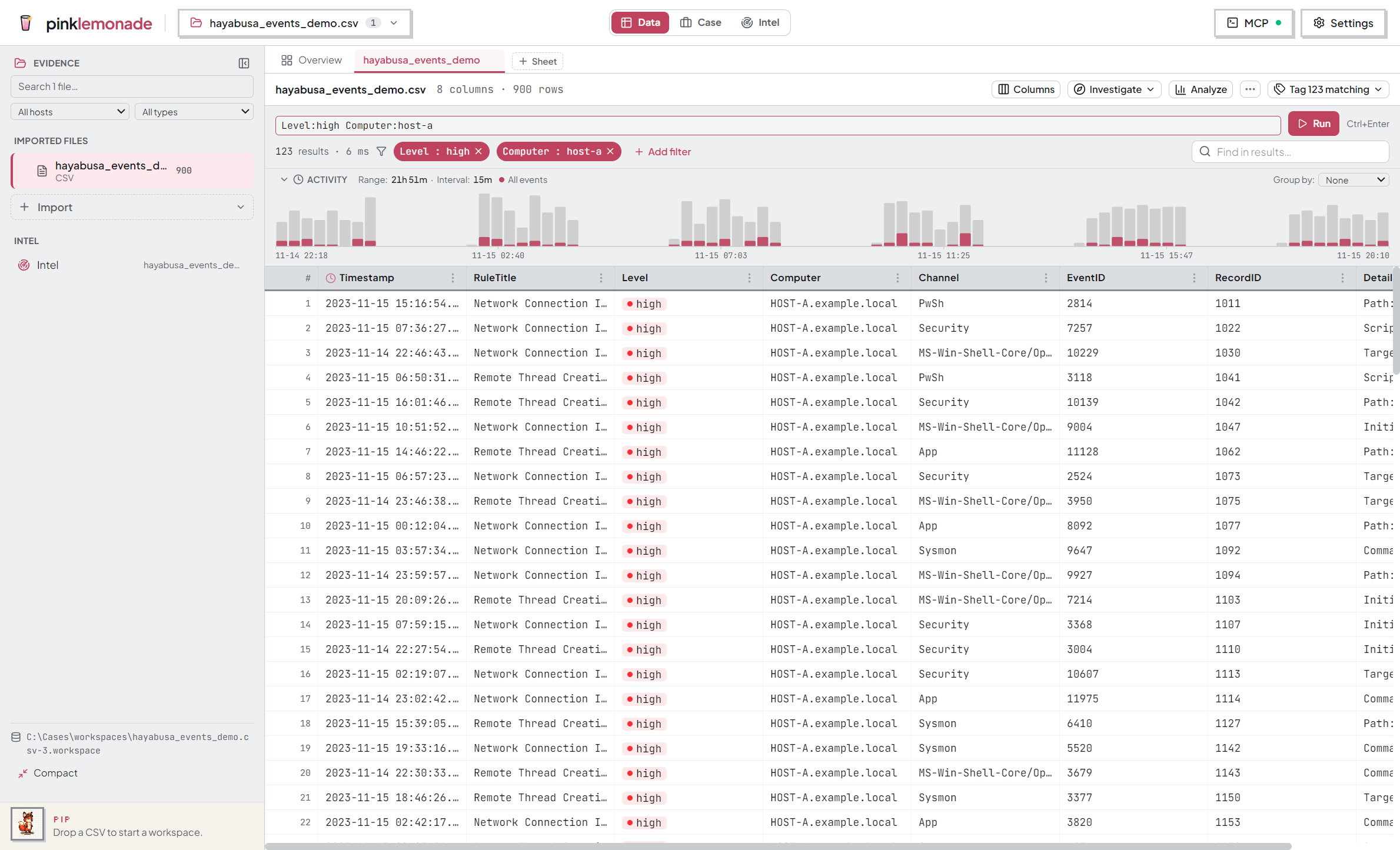
- Data — a virtualized grid for large sources: source tabs, split view, typed query expressions (
user:alice status=404), column summaries, pivots, read-only SQL, row tagging. - Case — review findings recorded by you or your agent, inspect cited evidence, track systems and indicators, build the report. Report checks flag unfinished review, evidence, coverage, or verification work.
- Intel — enrich indicators (MaxMind GeoIP, VirusTotal, your watchlists), scoped per case or global, with sweep sightings showing where each indicator appears in your evidence.
→ Workspaces · Exploring data · Tagging · Intel & watchlists · Intel Sweep
AI agent — drive the app from a terminal
No chatbot. Register the local MCP server with your agent once, then work from any case folder. The agent searches, correlates, and records evidence-backed findings; you approve or reject them in Queue, and the Report assembles what survived review. An optional independent check re-tests findings without seeing the original reasoning.
Guide
- Getting started — Home, first notepad, first import
- Notepad — text tools and chains
- Workspaces — imports, sources, hosts, storage
- Exploring data — the grid, query bar, Investigate/Analyze, time pivots
- Tagging — triage decisions on rows
- Intel Sweep — known indicators → sightings
- Intel & watchlists — enrichment and watchlists
- AI agent — connect, review, report
Good to know
- Local files. Workspaces, tags, sightings, and watchlists live under
%APPDATA%\pink-lemonade. - It remembers. Open documents, appearance, and layout come back on relaunch.
- Two looks. Retro (the signature look) or Modern (flat, for client work), independent of light/dark — in Settings.
- Built for large files. Database work runs off the interface thread; long operations show progress and can be canceled.
- Network is opt-in. Online enrichment sees indicators only when you start a lookup. A connected MCP client sends what it reads to its own model provider. The MCP server binds to
127.0.0.1.