Tagging
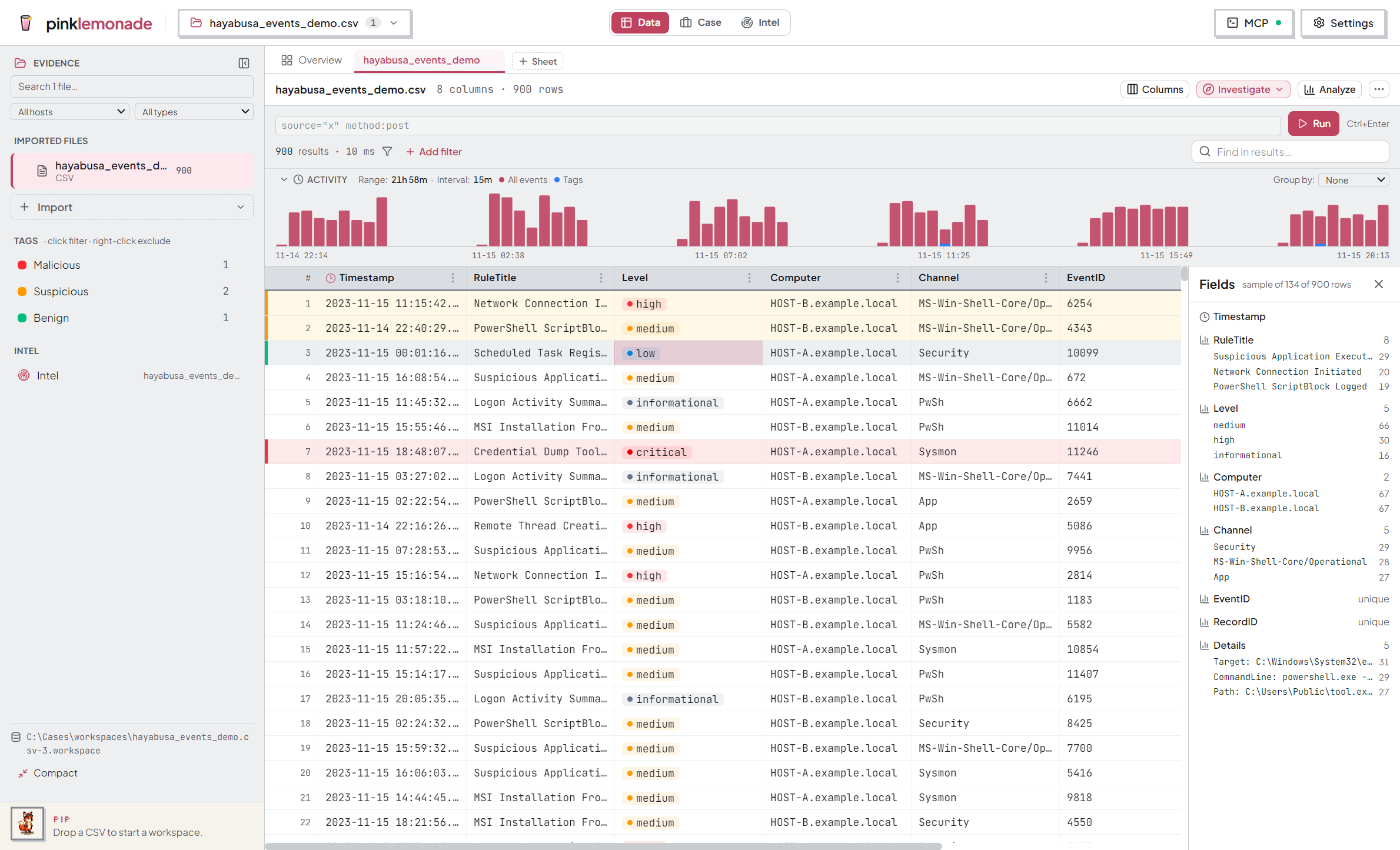
Tags record your triage decisions on rows and let you filter by them later. They’re saved in the workspace.
The four tags
🔴 Malicious · 🟠 Suspicious · ⚪ Unknown · 🟢 Benign — one tag per row, max.
Applying
- One row — right-click → Tag row as → pick a level (or Clear tag).
- Several rows — click a row number, Shift-click another, right-click → Tag N rows as…
- Everything matching the current filter — the Tag N matching ▾ toolbar button tags the whole filtered set (not just visible rows). It can clear them too.
Spotting them
Tagged rows get a colored left-edge bar plus a faint full-row tint — visible even scrolled far right.
Filtering by tag
The Tags section in the sidebar lists each used tag with its count:
- Click a tag → show only those rows. Click several → rows with any of them.
- Right-click a tag → exclude it instead.
- Clear tag filters drops them all. Active tag filters also show as chips in the query bar.
A typical flow
- Filter to a suspicious indicator.
- Tag N matching → Malicious.
- Pivot ±15 minutes around a key event; tag the surrounding rows as you review.
- Later, click the Malicious facet to revisit everything you flagged.