Intel & watchlists
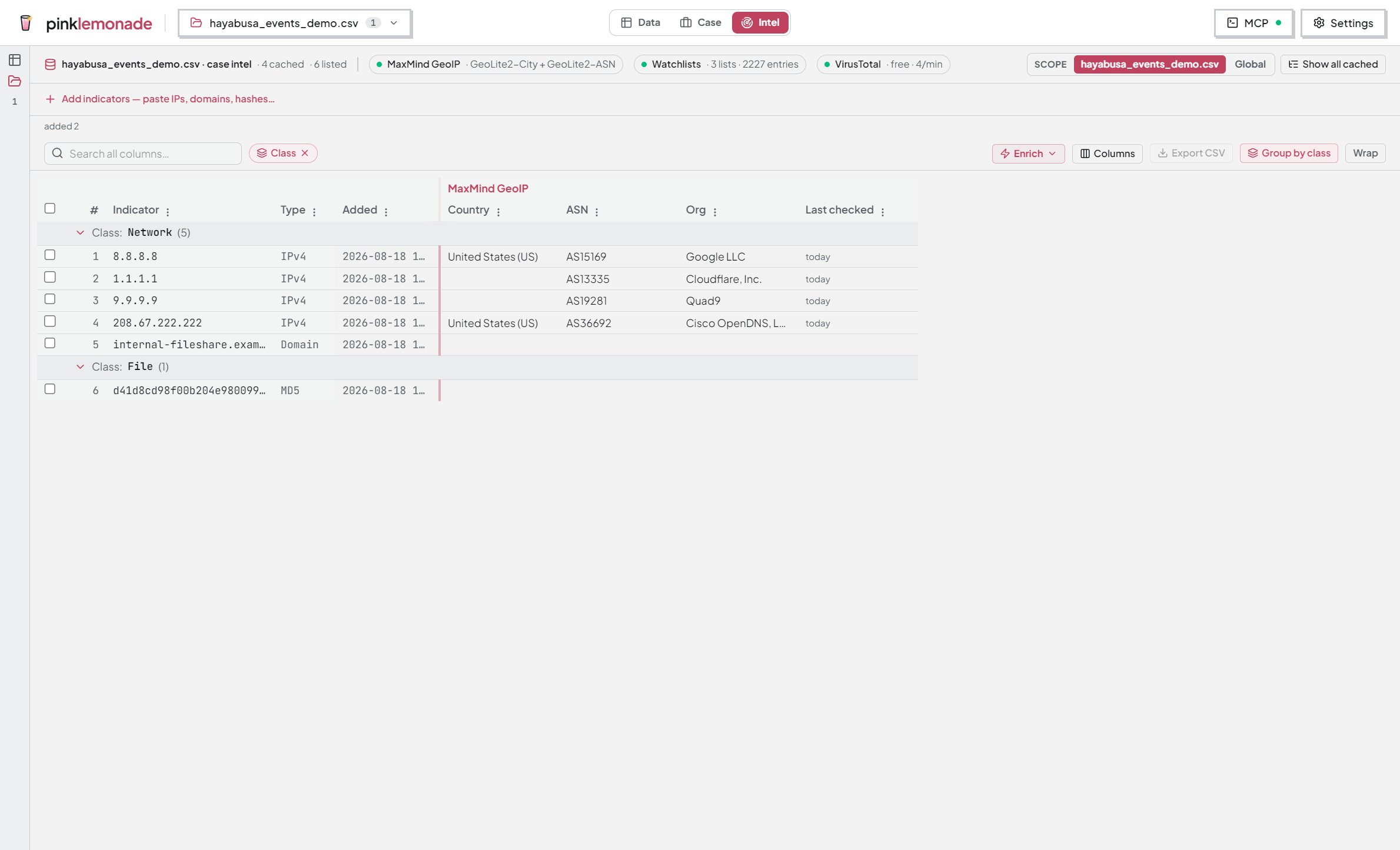
Intel is the third workspace mode: one row per indicator, grouped columns per provider. Enrich IPs, domains, and hashes; manage watchlists. Stored indicators load automatically when you enter it. Global Intel (Home → Tools) opens the shared library outside any case.
Scope
The Scope toggle in the header switches between this case (intel that belongs to the open workspace) and Global (the shared app-wide library). Grid, cache, and watchlists behave the same in both. Show all cached loads everything stored in the current intel DB into the list.
Adding and enriching
- Paste indicators into the box — it parses live (
3 IPv4 · 2 Domain · 1 already listed · 1 unrecognized) and the button becomes Add N. Unrecognized lines stay in the box for you to fix. The box collapses when it’s empty and the list isn’t; click Add indicators to bring it back. - Add only lists them. To look them up:
- Add & enrich (the split button) — add and run a provider on the new ones in one step.
- Enrich ▾ (toolbar) — run a provider on the selected rows, or all shown. Each provider shows how many shown rows it hasn’t checked yet.
- Right-click rows → pick a provider.
- Lookups are cache-first: a stored result is reused across cases and sessions until you explicitly re-check (right-click → Clear cached results, or the VirusTotal re-check confirm).
Reading the grid
- Type column: IPv4 / Domain / SHA-256 / … Rows group by class — Network, File, Other — toggle with Group by class.
- VirusTotal status chips say exactly what the provider observed:
- 🔴 Flagged · 4/91 — detections, with the count.
- 🟠 Suspicious — low-signal detections.
- 🟢 No detections — scanned, nothing flagged. Not a clean bill of health.
- ⚪ Unknown — VirusTotal has never seen it. Not the same as no detections.
- Not checked — never looked up.
- Coverage chips above the grid (
VirusTotal: 36 checked · 8 not checked · 28 stale) — click one to select those rows, then Enrich or re-check them. “Stale” = last checked over 30 days ago. - Last checked shows result age per provider. Sort, resize, reorder, search, export — same keyboard shortcuts as the data grid, plus Ctrl+Shift+C (copy indicators only) and Delete (remove from list).
Providers
Click a provider pill in the header to configure it.
- MaxMind GeoIP (included, local) — Country / City / ASN / Org from a local
.mmdb. Point it at yours, or let the app download GeoLite2 with your free MaxMind key. No network at lookup time. - VirusTotal (online, bring your own key) — IP / domain / hash reputation, v3 API. The key is validated once, the tier auto-detected (free keys pace at ~4/min; paid keys run unthrottled), and stored encrypted — write-only, never readable back, refused entirely if OS secure storage is unavailable. Results never auto-expire; re-checking a cached indicator takes an explicit confirm that shows the quota cost and time first.
- Watchlists (local, no key) — matches indicators against your lists into a Lists column.
Only a provider that grades indicators gets a Status column (VirusTotal). MaxMind and Watchlists report facts; their failures show as a chip in their first column.
Seen in your evidence
Inside a case, an indicator that’s been swept carries a “seen in N files” crosshair chip. Click it to open the Sightings rollup. Enrich an IP, sweep it, and its sighting count sits beside its status.
Watchlists
Curated lists of things you want recognized — corporate subnets, bad ASNs, blocked domains, malware hashes. Click the Watchlists pill to manage them.
- Kinds: IP (addresses + CIDR ranges), ASN, Domain, Hash. Entries normalize on paste; anything unparseable is reported as skipped.
- Global — saved on your machine, available in every case.
- Double duty: context during enrichment, and a one-click source for Intel Sweep.
Pivoting
- Into Intel — right-click a cell, a column’s distinct values, or notepad output → Send to Intel. Indicators land in the paste box for review.
- Out of Intel — select rows → right-click → Run Intel Sweep… to hunt them across a source.
A typical flow
- One external IP keeps showing up in Data. Right-click → Send to Intel.
- Enrich with MaxMind — unexpected hosting country.
- Add it to a Known bad infra watchlist.
- Next case: sweep that watchlist across the new timeline — the seen in N files chip shows where it landed.